

Is Your App Breaking the Bank?
By Dan Patrascu
In the ever-evolving landscape of software development, the power to create is at our fingertips. As developers, we bring digital dreams to life, crafting lines of code that breathe functionality into applications. But we can often get carried away by the power of our lines of code and end up forgetting that code is just a small element in running an app. Looking at it from a different perspective, each line of code that we write carries a price tag, and if we aren’t aware of it or if we don’t take full accountability of the financial repercussions of this, we might find ourselves in awkward situations.
I was myself the type of developer that totally neglected the financial implications of the apps I was writing until I worked with a CTO that made me realise I was missing the big picture. It’s true that the value of the applications we write lies in the business problems we solve. However, all business problems have an associated cost. So, if the cost of solving the problems is higher than the associated cost of the problems themselves, does our application still bring value?
I won’t go too deep into these topics right now, but CTOs have a precise way of evaluating this aspect by looking at the ratio between Total Cost of Ownership (TCO) and Return of Investment (ROI). The ROI measures the financial returns generated by a technology investment relative to its costs, while a TCO encompasses the entire cost associated with owning and operating a technology solution throughout its lifecycle. TCO includes not only the initial acquisition costs but also ongoing operational expenses, maintenance, and any other relevant costs.
CTOs must strike a balance between maximising ROI and minimising TCO. While maximising ROI is the goal, it must be achieved without disproportionately increasing the overall TCO. By identifying cost-saving opportunities in the entire lifecycle of a technology solution, CTOs can enhance the overall return on investment.
So where do our apps fit in? Apps generate operational costs through the amount of compute power, memory, storage and networking they require. This operational cost is a fundamental part of the TCO that I described earlier. There are a few areas where we can easily optimise costs just by being aware of the problems.
The Database as the Root of All Evil
In most applications, the database is the root of all evil when it comes to costs. Inefficient database schemas, insufficient use of indexes and inefficient queries unnecessarily increase the operational cost of our applications. But here are a few things we can easily trim.
First of all, do we really need Unicode everywhere? This is a huge topic since everything is NVARCHAR if we’re working with EF Core. But using NVARCHAR on columns that don’t need multi-lingual support (and therefore Unicode) is a waste of storage resources.
Let’s imagine that we have a 999GB database and all columns are NVARCHAR. If we’re running it on Azure SQL on the general-purpose tier with locally redundant storage, this would generate a cost of around £106/month only for storage. Now let’s imagine that we change the data type of all columns to be VARCHAR instead of NVARCHAR. For the same setup we would now have to pay only £53.
The bottom line is that we can easily optimise database costs just by using the appropriate data types. You can also easily configure your column data types in EF Core and it would look something like this:
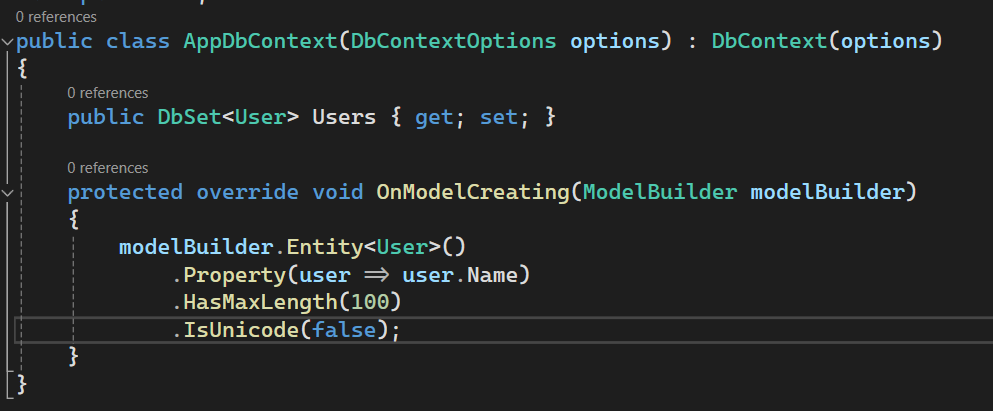
In this example we already see another optimisation: setting the maximum length. By default, EF Core will use NVARCHAR(max) or VARCHAR(max). This also makes inefficient use of storage. As developers, we might be tempted to overlook this, but what I usually try to do is have a max length defined on each string property that gets written to the database.
- Inefficient queries don’t just hurt the overall performance of our applications, but they also translate into higher operational costs. These costs can be generated by:
- Excessive CPU use
- Excessive memory use
- Unnecessary network calls (for instance, if we make several different DB calls for queries that can easily be retrieved in one).
Here are some very useful tips that will help you shape your queries as efficiently as possible:
- Make proper use of indexes
- Always use projections to retrieve only the data that you need
- Limit result size through efficient pagination
- Avoid cartesian explosion when loading related entities
- Favour streaming queries over buffering queries
- Always use AsNoTracking() for read-only use cases.
Let’s Make Big-O Notation Great Again!
Big-O notation is a mathematical notation that describes the limiting behaviour of a function when the argument tends towards a particular value or infinity. In computer science, it is primarily used to analyse the efficiency or time complexity of algorithms. I hated it and almost everybody that attended a “Data Structures and Algorithms” class does. It seems so abstract and useless.
Nevertheless, the efficiency of the algorithms we write directly affects the amount of CPU resources our algorithm will need. Scaling this to an entire application could mean that we exhaust all the CPU resources on a server faster. But we can autoscale it — that’s why cloud is cool, right? It may be cool, but it is also very costly.
And if you think that time complexity is something we need to think about only if we do our own sorting algorithm or generally complex algorithms, then think twice! A very common pattern that I see in a lot of code bases is the use of nested loops. Nested loops have a quadratic time complexity (O(n^2)), which is actually very bad. In fact, in around 80% of the cases I saw, nested loops could be avoided all together. Another example is recursion. Non-optimised recursions take an exponential time complexity (O(2^n)), which is also bad. Optimising recursions might be very time consuming and complicated, so another way to go about it is to avoid it where possible.
The main point here is you should always take some time to understand the time complexity of the algorithms you write, even if they are very simple. I understand that this is not always something that comes naturally, but it will give you a better understanding of the software you write and ultimately it will make you a better software engineer.
Let’s Get that Memory Back!
Like CPU usage, memory consumption is also a very important aspect that might make our application break the bank. The reason is the same: if we run out of memory, we need more memory, and this incurs costs. Another thing we should take into consideration is to optimise memory consumption. In my opinion, allocations are a big pain point. When we write code, we tend to do a lot of allocations. This not only consumes memory, but it also takes time to de-allocate it. Here are some very simple aspects that we can take into consideration to reduce memory allocation:
- Do we always need a class? A lot of times we could simply use structs instead of classes and this would reduce memory allocation.
- Will passing by value might become a problem? You can always pass and return by reference using the ‘ref’, ‘in’, ‘ref readonly’ and ‘out’ keywords. You can even have ref assignments!

- Directly manipulate memory through the Span<T> class. It provides safe access to blocks of memory.
Closing Thoughts
That’s mostly it. As a summary, to make sure that your application is not breaking the bank, make sure you ask yourself these 3 questions before shipping code:
- Does my code make efficient use of database resources?
- Does my code compute efficiently?
- Does my code allocate a lot of memory?
By doing this as an exercise on each PR. you will make this way of thinking about software your second nature. And in the end, this will make the CTOs you’re writing code for happier, and more likely to want to work with you.